

Domestic users may encounter some challenges when trying to log in to the official Tuke website, as access to Tuke is restricted in mainland China. However, with some creative methods, users can still try to access and use Tuke. So how do you log in to the official Tuke website? With 1 network cable and 3 methods, it can be easily done!
1 network cable: Building a dedicated Tuke network line
Before starting, you need to ensure that your device (mobile phone or computer) can connect to the overseas internet in order to access the official Tuke website normally. Therefore, you need to contact a professional Tuke service provider to set up a dedicated overseas Tuke network line for you, with a dedicated IP to prevent account bans and 5M upload bandwidth for smooth live streaming.
3 methods:
Method 1: Register with Email (Overseas Email)
1. Open the official Tuke website: Enter https://www.tiktok.com in your browser and open it.
2. Click the login button: Find and click the "Login" button in the upper right corner of the webpage.
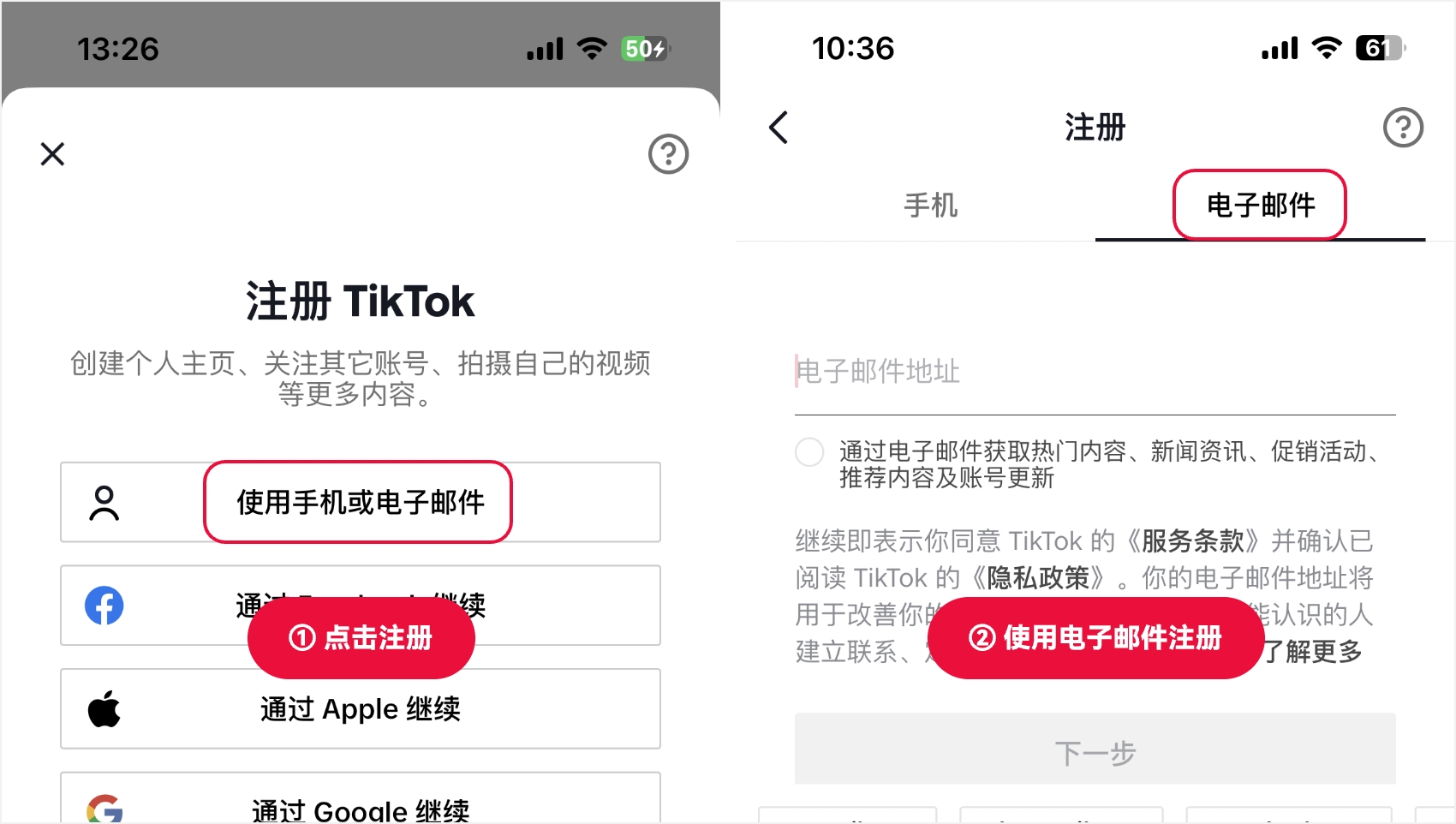
3. Choose email registration: On the login interface, select the "Register with Email" option.
4. Fill in registration information: Enter your email address and set a secure password. You need to use an overseas email to register successfully. It is recommended to use an Outlook email, as registration is relatively convenient.
5. Complete the registration process: Follow the website prompts to complete the registration process, including email verification and other steps.
6. Log in to your new account: After registration is complete, use your email and password to log in to Tuke.
Method 2: Register with Mobile Number (Non-Mainland Number Required)
1. Prepare a non-mainland mobile number: Since Tuke restricts the use of mainland mobile numbers for registration, you need to prepare a non-mainland mobile number.
2. Visit the official Tuke website: Enter the official Tuke website address in your browser and open it.
3. Choose mobile number registration: On the login interface, select the "Register with Mobile Number" option.
4. Enter your mobile number: Enter your non-mainland mobile number and obtain the verification code.
5. Set a password: Enter the received verification code and the password you set to complete the registration.
6. Log in to your account: After registration is complete, use your mobile number and password to log in to Tuke.
Method 3: Log in with a Third-Party Account
1. Understand third-party login options: Tuke supports logging in with third-party accounts such as Google, Facebook, or Twitter.
2. Choose third-party login: On the Tuke login interface, select "Register with Third-Party Account."
3. Log in to your third-party account: Enter your third-party account information to log in.
4. Pay attention to risks: Logging in with a third-party account may pose account security risks, as the status of third-party services may affect your Tuke account.
Although there are some restrictions, with the above 1 network cable and 3 methods, domestic users can still try to access and use the official Tuke website. Please remember that technological developments and policy changes may affect the effectiveness of these methods, so it is recommended to check the latest information and guidelines before trying. At the same time, protecting personal information and account security should always be the top priority when using any online service.
What this signal means for growth teams
This market signal should be treated as an operating prompt, not a standalone trend. The brand question is whether the team can connect TikTok content, creators, paid media, commerce readiness, and reporting into one measurable growth cycle.
Commercial read
- Market signal: TikTok marketing tips - short video marketing methods
- Published: May 23, 2024
- Commercial lens: TikTok Ads, creators, TikTok Shop, live commerce, and reporting.
- Source transparency: the original source linked in this article
What brands should do next
- Identify the market, audience, product group, and KPI this signal could affect.
- Turn the insight into a small TikTok creative, creator, Shop, or paid media test before scaling spend.
- Add FAQ, offer clarity, product proof, and contact paths so traffic can convert instead of only reading.
- Review weekly performance across reach, click quality, Shop actions, creator output, and revenue impact.
Tuke Marketing helps brands connect TikTok Ads, creator partnerships, TikTok Shop operations, live commerce, and reporting into one accountable operating system.
What should brands do with this TikTok signal?
Brands should translate the signal into a focused operating test across creative, creators, TikTok Shop readiness, paid media, and reporting before increasing budget.
How does Tuke Marketing evaluate this kind of news?
Tuke Marketing reviews platform news through market timing, category demand, creator supply, commerce readiness, and measurable growth actions.
When should a team contact Tuke about this topic?
A team should contact Tuke when it needs to turn a TikTok market signal into a practical launch, creator, advertising, live commerce, or reporting plan.
Source transparency: Tuke cites the original source linked in this article and adds its own operating analysis for brands evaluating TikTok growth decisions.